


 Downloads
 Close
CloseArticle
A complete introduction to AI computer vision
Computer Vision has evolved from a pioneering experiment in 1957 to one of the most transformative fields in artificial intelligence today. In this guide, we explore the fundamentals: its history, how it works, key tasks, and real-world applications shaping industries globally.
January 6, 2026

Introduction to computer vision fundamentals and examples
In this article we will see a deep introduction to computer vision that has been very strong and important these recent years and what we can make with it. For that we will start to understand what it is, where it comes from and some examples, so let’s get started.
What is it?
Computer vision is a field of artificial intelligence (AI) that uses machine learning and neural networks to teach machines to derive meaningful information from digital images, videos, and other visual inputs and to make recommendations or take actions based on their outputs.
It functions similarly to human vision, but humans have the advantage of a lifetime of context. We learn to distinguish objects through years of experience and generational knowledge, estimate distances using our two eyes, recognize motion, and detect when something is wrong in an image by drawing on our memory and past experiences. Computer vision trains machines to perform these functions, but it must do so in much less time by using cameras rather than eyes. Because a system trained to inspect objects or monitor a product can analyze thousands of them a minute, freeing humans from boring repetitive labor, and it can quickly surpass human capabilities.
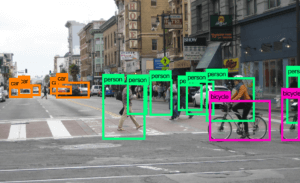
Brief history
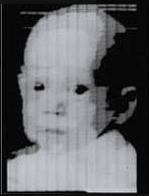
In 1957, at the American National Institute for Standards and Technology, where a group of engineers, led by Russell Kirsch, succeeded in making the first ever digital scan of an image. The image they used was of Russell’s infant son, which became so famous that Life magazine included it in its article about 100 images that changed the world. The original image is being kept in the Portland Art Museum.
In 1959, two neurophysiologists, David Hubel and Torsten Wiesel, became interested in the way in which the brain interprets visual stimuli. They decided to do an experiment on the cat’s primary visual cortex. Using electrodes, they studied the activation of neurons while showing images to the cat. It was concluded that there are simple and complex neurons and that visual processing starts with simple structures (lines and edges). Later on, in 1982, British neuroscientist David Marr expanded this study, claiming that the process of visual recognition has a hierarchical structure, starting with recognizing fundamental concepts and then building a three-dimensional map of the image. Those hypotheses were used as building blocks of the first visual recognition system.
In his doctorate thesis in 1963 at MIT, Lawrence Roberts, generally considered the father of computer vision, presented a process for getting information about a 3D object from a 2D image. He later went to work for DARPA and took part in developing the Internet.
In 1979, when a Japanese computer scientist Kunihiko Fukushima developed an artificial network for pattern recognition, which was made from convolutional layers treating a part of image as a whole and in that way they didn’t ignore mutual dependence of neighboring pixels. He called it Neocognitron and it is undoubtedly the origin of networks which are even currently dominating the world of automatic visual recognition.
In 1989, a computer scientist Yann LeCun used a famous training algorithm on a network based on Neocognitron and successfully applied it for reading and recognizing postal codes. He is also responsible for one of the most famous datasets in Machine learning, the MNIST dataset of handwritten digits.
The biggest advance happened in the year 2012, when AlexNet drastically reduced the error rate in object classification on the ImageNet dataset. The ImageNet dataset was made in 2010 because of the evolution in algorithms for image processing. It consists of more than a million images divided into 1000 classes of everyday objects (animals, types of balls, modes of transport, etc).
From then on, computer vision technology never stopped growing, creating new branches of study and development like Identification, detection, recognition, tracking and segmentation.
How does it work?
A computer vision system usually follows three main steps:
- Image Acquisition
The system first captures visual data using cameras, sensors, or scanners.
- Image Processing
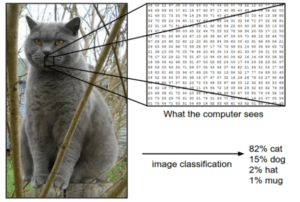
The raw images are cleaned and prepared. This may include adjusting brightness, removing noise, enhancing contrast, or resizing the image. Computers see images as grids of pixels, each with numbers representing color and brightness.
- Image Understanding
This is where the system interprets what it sees using machine learning.
- Feature Extraction: The system looks for important visual patterns—edges, shapes, colors, textures.
- Learning and Recognition: Using trained models like Convolutional Neural Networks (CNNs), the system compares these features to known patterns and learns to label what it sees (e.g., “car,” “person,” “tumor”).
- Decision Making: Finally, the system takes an action based on what it recognized—such as detecting a defect, identifying a face, or telling a self-driving car how to steer.
Key Technologies
- Deep Learning: Uses multi-layered neural networks to automatically learn patterns from data.
- Convolutional Neural Networks (CNNs): Special neural networks designed for image analysis.
- Machine Learning: Provides methods for systems to improve as they see more data.
Common Computer Vision Tasks
Let’s now explore some of the most common Computer Vision tasks, covering their history, underlying mechanisms, and various application areas.
1. Image Classification
Image classification is the task of assigning a single, discrete label to an entire image based on the objects or scenes it contains. The goal is to determine what is in the image, without specifying the location or quantity of objects. It’s the most fundamental computer vision task and serves as the basis for more complex tasks like object detection.
In the 1960s and 1970s, researchers relied on simple pattern recognition techniques, using handcrafted features such as edges, corners, and textures. These early systems were capable of distinguishing between basic shapes or letters, but struggled with complex natural images.
By the 1980s and 1990s, more sophisticated features were developed, including SIFT (Scale-Invariant Feature Transform) and HOG (Histogram of Oriented Gradients). These features captured more robust representations of objects, and when combined with classical machine learning classifiers like Support Vector Machines (SVMs) or k-Nearest Neighbors, image classification became significantly more reliable.
In 2012 AlexNet, a deep convolutional neural network, won the ImageNet Large Scale Visual Recognition Challenge (ILSVRC). For the first time, deep networks trained end-to-end on large datasets outperformed traditional methods by a wide margin.
How it works:
- Input images are preprocessed (resized, normalized).
- Convolutional Neural Networks (CNNs) extract hierarchical features: low-level (edges, corners), mid-level (textures, patterns), and high-level (object parts).
- A fully connected layer or classifier predicts a probability for each category.
- The category with the highest probability is assigned as the label.
Applications:
- Detecting disease in medical scans (X-rays, MRIs).
- Sorting images in e-commerce or social media.
- Automatic tagging in photo apps.
2. Object Detection
Object detection is the task of not only identifying objects in an image but also localizing them with bounding boxes. Unlike classification, detection tells you both what is present and where it is.
Early object detection techniques emerged in the late 20th century, with the landmark work of Viola and Jones in 2001. Their system used Haar-like features combined with an AdaBoost classifier to detect faces in real time, a remarkable achievement at the time.
In the 2010s convolutional neural networks to detection were introduced. R-CNN, introduced in 2014, combined region proposals with deep features, dramatically improving accuracy.
How it works:
- Models slide a detection window over the image at multiple scales or use anchor boxes to predict objects.
- Feature maps are analyzed using CNNs to classify and regress bounding boxes.
- Modern approaches like YOLO (You Only Look Once) and Faster R-CNN perform detection in a single forward pass or with region proposals.
Applications:
- Autonomous vehicles: detecting pedestrians, cars, traffic signs.
- Surveillance: detecting intruders or abnormal activities.
- Retail: monitoring stock on shelves.
3. Image Segmentation
Image segmentation partitions an image into multiple segments, often at the pixel level, to identify boundaries and shapes of objects. It provides a more detailed understanding than detection.
Early methods, in the 1980s and 1990s, relied on thresholding, edge detection, and region-growing techniques. These methods worked for controlled scenarios but were brittle in real-world images.
In the 2000s, graph-based methods such as Normalized Cuts and Conditional Random Fields (CRFs) improved segmentation by considering relationships between pixels. The deep learning era brought architectures like U-Net (2015) and Mask R-CNN (2017), which allowed for pixel-level semantic and instance segmentation.
Types:
- Semantic segmentation: Assigns each pixel a class label (e.g., road, sky, car).
- Instance segmentation: Distinguishes between different instances of the same class (e.g., two cars separately).
How it works:
- CNN-based architectures (U-Net, Mask R-CNN) learn to predict pixel-level masks.
- Each pixel is labeled, creating detailed maps of objects or regions.
Applications:
- Autonomous driving: segmenting roads, lanes, pedestrians.
- Medical imaging: outlining tumors or organs.
- Augmented reality: separating objects from backgrounds.
4. Object Tracking
Object tracking is the process of monitoring objects’ positions across consecutive video frames. Unlike detection, which processes each frame independently, tracking preserves object identity over time.
Classical approaches in the 1970s and 1980s used Kalman filters, particle filters, or template matching, which could predict motion but were limited by occlusion and lighting changes.
Feature-based trackers such as the Kanade-Lucas-Tomasi (KLT) tracker improved robustness by tracking keypoints rather than whole objects. With the advent of deep learning, trackers like DeepSORT and Siamese network-based trackers emerged, enabling reliable real-time tracking even in crowded scenes.
How it works:
- Detection provides initial object locations.
- Tracking algorithms (Kalman filter, SORT, DeepSORT) predict future positions and associate detections frame-to-frame.
Applications:
- Sports analytics: tracking players or balls.
- Video surveillance: following moving people or vehicles.
- Robotics: following moving targets in real time.
5. Optical Character Recognition (OCR)
OCR is the process of detecting, segmenting, and recognizing text from images to convert it into machine-readable text.
In the 1920s and 1930s was when the first significant steps were taken in developing machines that could “read” text. By the 1980s and 1990s, feature-based approaches combined with machine learning classifiers improved accuracy. Modern OCR leverages deep learning, particularly LSTM and CNN-based models, which can handle handwriting, diverse fonts, and even text in natural scenes. OCR now powers document digitization, license plate recognition, and augmented reality translation apps.
How it works:
- Detect regions containing text.
- Segment lines, words, and characters.
- Use pattern recognition or deep learning to classify each character.
- Reconstruct the text sequence.
Applications:
- Digitizing printed documents.
- Automatic license plate recognition.
- Translating text in images or AR applications.
6. Pose Estimation
Pose estimation detects and predicts the position of keypoints in humans, hands, or faces, representing joint locations or landmark positions.
The 2000s introduced pictorial structures, representing the body as connected parts with probabilistic models. Deep learning revolutionized pose estimation starting with DeepPose in 2014, which directly regressed joint coordinates using CNNs. OpenPose and other modern systems allow real-time multi-person 2D and 3D pose estimation, enabling applications in gaming, fitness, and safety monitoring.
How it works:
- CNNs or heatmap-based networks predict coordinates of keypoints.
Applications:
- Fitness apps: monitoring exercises and posture.
- Gaming: motion capture for avatars.
- Safety monitoring in workplaces.
7. Image Generation and Enhancement
Image generation refers to creating new images from scratch or modifying existing images using AI. Enhancement improves quality, removes noise, or increases resolution.
The development of Generative Adversarial Networks (GANs) in 2014 enabled machines to generate entirely new images, produce super-resolution outputs, and perform style transfer. Today, AI-generated images are used in entertainment, art, virtual environments, and restoring old or low-resolution images.
How it works:
- Generative models like GANs (Generative Adversarial Networks) create realistic images.
- CNNs and transformer-based networks perform super-resolution or denoising.
Applications:
- Enhancing low-resolution photos.
- Generating realistic avatars or artwork.
- Filling missing parts of images (inpainting).
8. Facial Analysis
Facial analysis detects, recognizes, and interprets human faces, including identity, emotion, and attributes.
In the 1960s, systems like Eigenfaces and Fisherfaces used linear projections for recognition, achieving modest success under controlled conditions. The 2000s brought real-time face detection with Haar cascades, while deep learning-based approaches such as FaceNet, DeepFace, and ArcFace now provide highly accurate recognition across diverse poses, lighting, and expressions.
How it works:
- Face detection locates faces.
- Feature extraction converts faces into embeddings or keypoints.
- Recognition or classification identifies individuals or attributes.
Applications:
- Security: facial authentication.
- Social media filters and AR applications.
- Market research: analyzing customer emotions.
9. Scene Understanding / Image Captioning
Scene understanding involves comprehending the entire image context, including objects, relationships, and sometimes generating descriptive text (captioning).
Early systems in the 1980s and 1990s relied on rule-based methods or low-level features. Modern approaches combine CNNs for feature extraction with RNNs or Transformer-based models to generate textual descriptions. Models like Show-and-Tell or Show-Attend-and-Tell can now describe images in human-like language, enabling accessibility for visually impaired users and intelligent image search.
How it works:
- CNNs extract image features.
- RNNs or Transformers generate captions based on visual features.
- Provides a semantic description of the scene.
Applications:
- Helping visually impaired users by describing images.
- Robots navigating complex environments.
- Automatic image tagging for search engines.
10. 3D Reconstruction and Depth Estimation
3D reconstruction estimates the three-dimensional structure of objects or scenes from 2D images. Depth estimation predicts the distance of each pixel from the camera.
Stereo vision and triangulation methods date back to the 1980s, while Structure-from-Motion (SfM) became popular in the 2000s. Recent deep learning methods, including monocular depth estimation and Neural Radiance Fields (NeRFs), can produce highly detailed 3D models from single or multiple images.
How it works:
- Stereo vision uses two cameras to calculate depth.
- Monocular depth estimation uses CNNs to predict depth from a single image.
- Photogrammetry reconstructs 3D models from multiple images.
Applications:
- Robotics and autonomous navigation.
- Augmented/virtual reality.
- Architecture and heritage preservation.
Example
Face Detection Using Haar Cascades in Google Colab
Face detection is one of the classic tasks in computer vision. Before deep learning became the standard, a very popular and efficient technique was Haar Cascade Classifiers, a method introduced by Viola & Jones that enabled real-time face detection even on simple hardware. Even today, Haar cascades remain useful for learning and quick demos.
What Are Haar Cascades?
A Haar Cascade is a machine-learning model trained to detect specific patterns—in this case, faces. It uses:
- Haar-like features (simple edge/line patterns)
- Integral images (for very fast computation)
- A cascade structure (quickly rejects non-face regions)
This makes the method lightweight and fast.
How It Works (Simplified)
- Convert an input image to grayscale (faster + fewer computations)
- Scan the image with a sliding window
- Classify each region as “face” or “not a face”
- Mark detected faces with rectangles
Below is a Google Colab-ready tutorial, including all steps you need.

Then connect to the Google Drive, which contains the pre-trained model and some datasets, to load and process the image (you can find this model in HERE ).
We are gonna resize the image to be the same size as the AI model can take and make it gray scale to remove the color variable and reduce the time of training and/or detection.
First we will set some imports some libraries that we will use in this example:
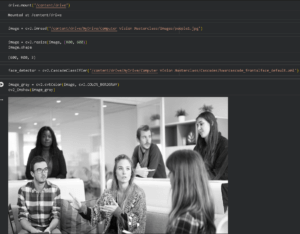
After testing the model and reviewing the results, we can identify that it incorrectly detected 6 faces instead of 5.
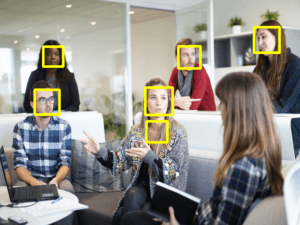
Haar Cascades scans the image at multiple scales (sizes), because faces can appear small or large.
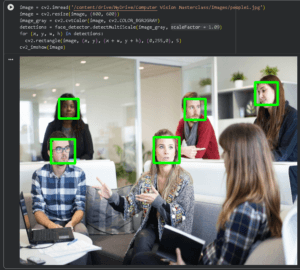
Instead of resizing the detection window, OpenCV usually resizes the whole image repeatedly and searches for faces at each scale. The scaleFactor tells OpenCV how much to shrink the image each time. With that information, we can change the scale factor from 1 to 1.09, resulting in 5 face detections.
Conclusion
In this article, we discussed the fundamentals of Computer Vision, its various applications, and how it can be used in real-world situations. The key takeaway is that Computer Vision is not just theoretical; it is actively being used to solve complex problems ranging from medical diagnostics and self-driving cars to smart factory automation and retail analysis. Our goal was to not only provide you with a solid understanding of what Computer Vision is, but to also inspire you to look into its potential and how it could benefit you in your work or in your business.
If this has sparked your interest and you are curious and want to learn more about Artificial Intelligence, check out our “Introduction to Artificial Intelligence” article.